> ## Documentation Index
> Fetch the complete documentation index at: https://flowglad.mintlify.site/llms.txt
> Use this file to discover all available pages before exploring further.
# Prices
> Individual pricing schemes that you can attach to a product
Prices are where the important billing and monetary information in your catalog lives. They belong to products and come in distinct types that enable different billing behaviors.
## Price Types
Flowglad supports three types of prices, each serving different billing needs:
### Single Payment Prices
The simplest form of pricing - a one-time payment (`unitPrice`) for a product or service. These prices do not have recurring intervals, trial periods, or setup fees.
### Subscription Prices
Enable recurring revenue by charging a fixed amount (`unitPrice`) on a set interval. These prices have:
* **Interval Unit**: The time unit for billing (e.g., `month`, `year`). Required.
* **Interval Count**: How many units between billings (e.g., `1` for monthly, `3` for quarterly). Required. Defaults to 1, but configurable in the [create](/api-reference/prices/create-price) and [update](/api-reference/prices/update-price) prices API endpoints.
* **Trial Period Days** (optional): How long to run a free trial after checkout before the first charge.
### Usage Prices
For billing based on actual usage of your product or service, charged on a recurring interval. Key characteristics:
* Associated with a specific [usage meter](/features/usage). Required via `usageMeterId`.
* Usage charges are typically calculated and billed at the end of the billing period (based on `intervalUnit` and `intervalCount`), unlike standard subscriptions which charge at the start.
* **Usage Events Per Unit**: How many usage events are considered one unit to be charged at the unit price. Required.
* Any usage price can be set as the **default price** for its usage meter. When usage events are created using a meter identifier (`usageMeterSlug` or `usageMeterId`), the system resolves to this default price.
* Every usage meter has an auto-generated [no-charge price](/features/usage#no-charge-prices) (`{usagemeterslug}_no_charge`) that serves as the fallback default.
Usage meter prices combine recurring billing cycles with variable charges based on consumption tracked by a usage meter.
## Default Price
### Product Default Price
Each product has a default price. This is the price presented by default in checkouts or API calls when a specific price isn't requested.
* Only one price per product can be the default active price at any time. If you set a new price as the default (either on creation or by updating), any existing default price for that product will automatically have its `isDefault` flag set to `false`.
### Usage Meter Default Price
Usage meters also have default prices, separate from product default prices. This determines which price is used when creating usage events via `usageMeterSlug` or `usageMeterId`.
* Every usage meter has a guaranteed default price—either a price you've configured or the auto-generated [no-charge price](/features/usage#no-charge-prices).
* If you unset the current default price for a usage meter, the no-charge price automatically becomes the default.
* The `_no_charge` slug suffix is reserved for these auto-generated prices and cannot be used for user-created prices.
## Choosing the Right Price Type
Your choice of price type impacts how and when your customers are billed:
* Use **Single Payment** for one-off purchases.
* Use **Subscription** for predictable recurring revenue charged at the start of each period.
* Use **Usage Meter** for recurring billing cycles where the amount charged reflects actual consumption during the period, typically billed at the end.
Read more about [usage meters](/features/usage) to understand how they work with usage-based pricing.
## Creating a Price
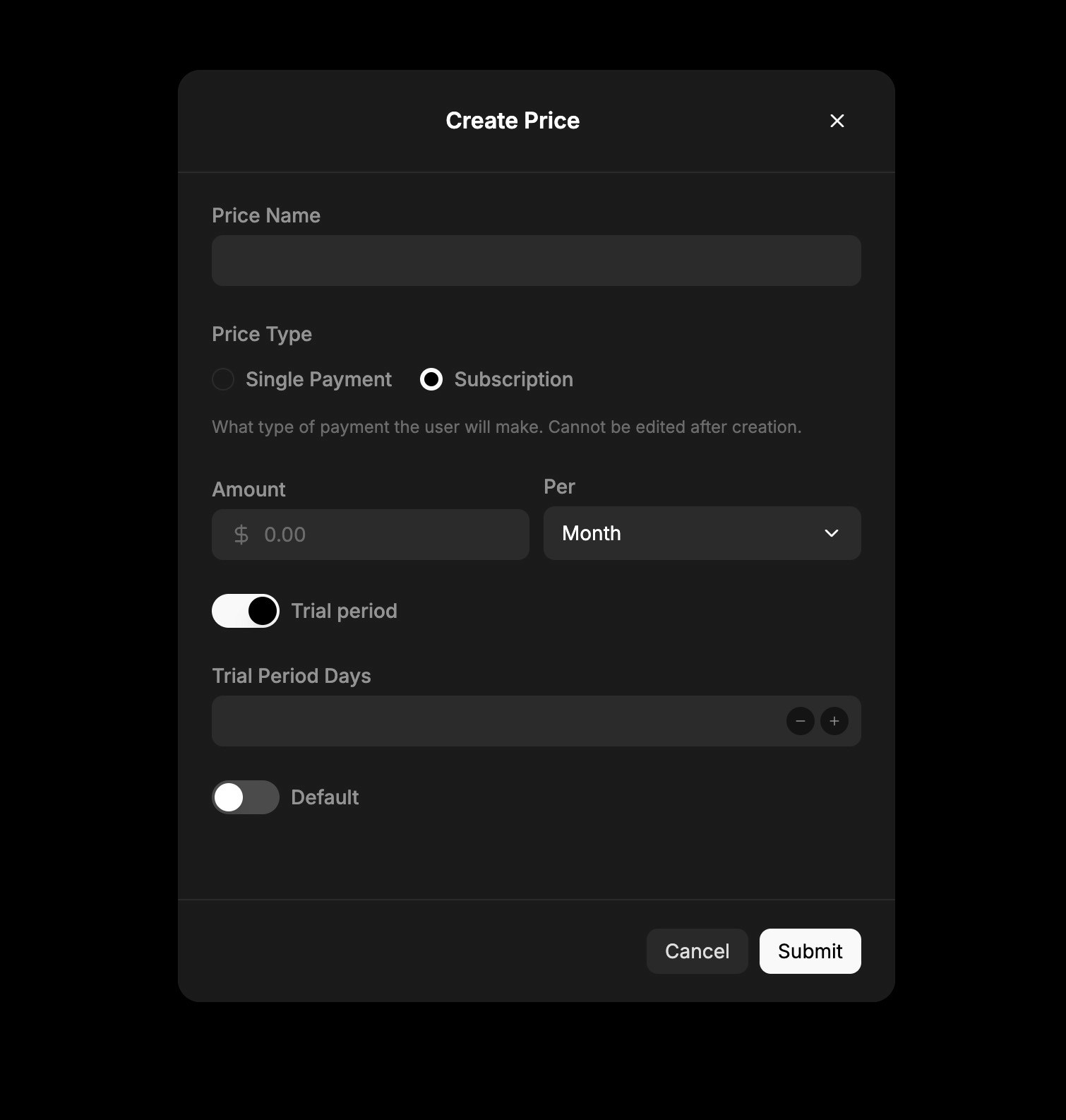 Prices are first created when you create a product from the pricing model page.
You can then update the price from the edit button for the product on the pricing model page by:
1. Selecting a product
2. Clicking the "New Price" button
3. Filling out the price details form
When creating a price, you'll need to provide:
* **Unit Price**: The amount to charge (in cents/pence)
* **Type**: Choose between Single Payment, Subscription, or Usage Meter
Additional fields will appear based on the price type selected:
* For **Subscription** prices:
* Interval Unit (month/year)
* Optional Trial Period Days
* For **Usage** prices:
* Usage Meter selection
* Usage Events Per Unit
Prices are first created when you create a product from the pricing model page.
You can then update the price from the edit button for the product on the pricing model page by:
1. Selecting a product
2. Clicking the "New Price" button
3. Filling out the price details form
When creating a price, you'll need to provide:
* **Unit Price**: The amount to charge (in cents/pence)
* **Type**: Choose between Single Payment, Subscription, or Usage Meter
Additional fields will appear based on the price type selected:
* For **Subscription** prices:
* Interval Unit (month/year)
* Optional Trial Period Days
* For **Usage** prices:
* Usage Meter selection
* Usage Events Per Unit